AI can read a lot, fast. It can also be confidently wrong. If you make money decisions, the useful question is not “should I use AI?” It is “what job do I give it, and how do I check its work?”
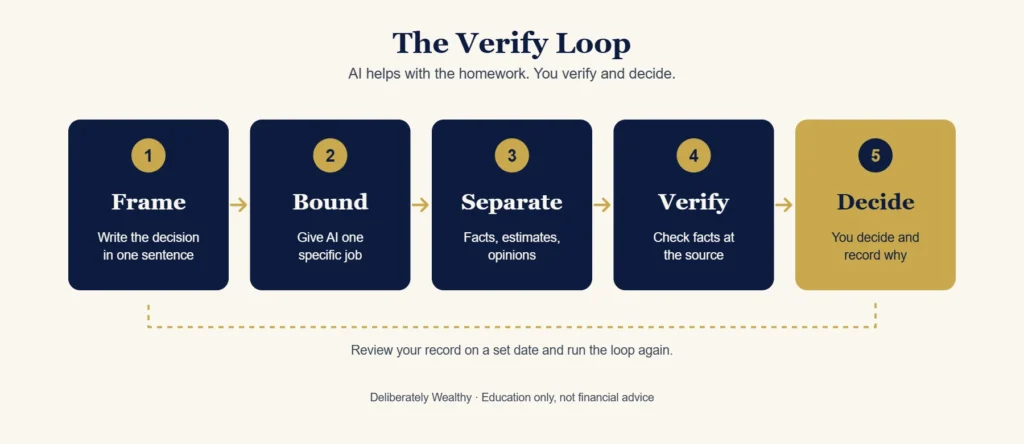
This is the routine we use at Deliberately Wealthy. We call it the Verify Loop. It works whether you are trimming a subscription list or pressure-testing an investment idea.
This is education, not financial advice. Nothing here is a recommendation to buy, sell or hold anything.
What AI is good at, and what it is not
Good at
- Summarising long documents (statements, fee schedules, policy terms).
- Laying out the questions you should be asking.
- Building a checklist or comparing options against criteria you supply.
- Playing devil’s advocate against your own reasoning.
- Organising numbers you give it.
Not reliable at
- Current prices, rates, tax rules, and anything that changes. It may be out of date or invent details.
- Knowing your full situation.
- Flagging its own mistakes. AI may sound confident even when its answer is uncertain or wrong.
- Deciding for you.
The five steps
1. Frame the decision
Write one sentence: “I am deciding whether to ___, by ___, given ___.” Include constraints (time horizon, risk tolerance, account type, what you refuse to do). A vague question gets a vague, generic answer.
2. Give AI a bounded job
Ask for a specific output: “List the five questions I should answer before this decision,” “Summarise the fee structure in this document,” or “Argue the strongest case against my plan.” Do not ask “what should I do?”
3. Separate facts from claims
Ask the AI to label each statement as (a) a fact that can be checked, (b) an estimate or assumption, or (c) an opinion. Then list every checkable fact.
New workflows built on this loop go out in the Weekly Brief.
4. Verify the facts at the source
For each checkable fact, go to a primary source: the provider’s own document, your statement, a regulator or tax authority page, the company’s filings. If you cannot verify it, treat it as unknown. Never act on a number you have not seen at its source.
5. Decide, and write down why
You make the call. Record the decision, the reasons and what would change your mind. Review it on a date you set. This record is what lets you learn from AI-assisted decisions instead of just repeating them.
Two worked examples (illustrative, not real cases)
Example A: subscription audit (Save). You paste your own list of recurring charges (with account numbers removed). AI groups them, flags duplicates and asks which ones you actually use. You verify by checking each provider’s cancellation terms. You decide what to cancel. We walk through this one step by step in A 30-Minute AI-Assisted Subscription Audit.
Example B: a research question (Invest). You ask AI to list what an investor would need to check before considering an idea: business model, risks, valuation approach, and what would prove the thesis wrong. You then research each item in filings and independent sources. AI helped structure the homework; it did not supply the answer.
Habits that keep you safe
- Never paste identifying or sensitive data (account numbers, passwords, full statements) into a tool you have not vetted.
- Ask for the counter-argument every time.
- Use more than one source of AI or research when the stakes are high, and treat disagreement as a prompt to check, not a vote.
- Keep a decision log.
- Get professional advice where the decision is large, legal or tax-sensitive.
A one-page version
- Frame it.
- Bound the job.
- Sort facts from claims.
- Verify at the source.
- Decide and record.
Common questions
Can I trust AI with financial decisions?
Not on its own. Use it to structure research, then verify facts at the source and decide yourself.
Is it safe to paste my statements into AI?
Avoid sensitive identifiers. Redact account numbers and personal details, and check the tool’s data settings.
Is this financial advice?
No. It is general education.
Get the next workflow
We share workflows built on this loop, and tests of what does and does not work, in the Weekly Brief. It is free.
See also: our methodology, and the Optimize section.
Deliberately Wealthy may earn affiliate commissions from some links. Commissions never determine what we test or recommend. See our Affiliate & Editorial Disclosure. Education only; not personalised financial, tax or legal advice.