Recurring charges are easy to lose track of because they run in the background. A monthly plan you meant to try once. An annual renewal that arrives eleven months after you signed up. A free trial that quietly became a paid plan. Each one looks small on its own, and none of them asks for your attention again.
A subscription audit fixes that by making them visible, one time, on purpose. AI is genuinely useful for the slow part: reading a long list of transactions and spotting patterns. It is not reliable for the parts that matter: confirming what is real, what your terms say, and what you actually want to keep.
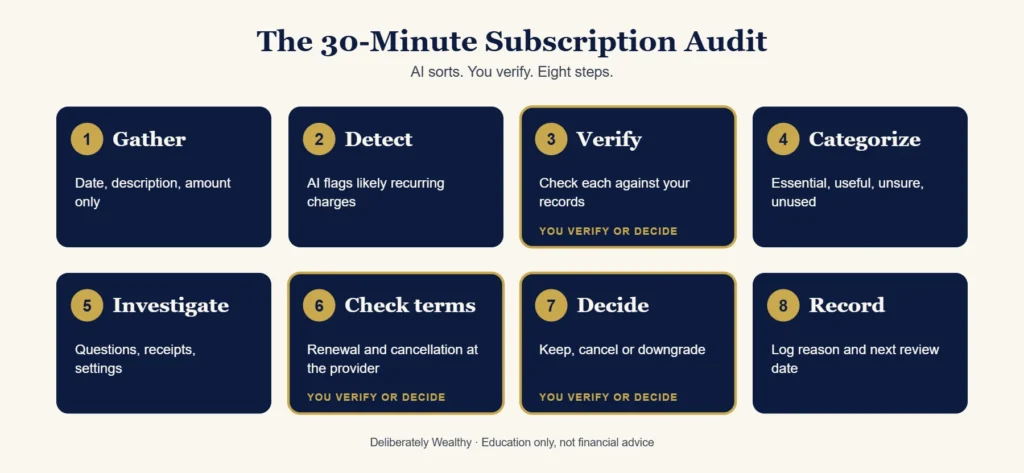
So this workflow splits the job cleanly. AI sorts. You verify. You decide.
This is education, not financial advice. It does not recommend any product, and it makes no promise about how much you will find or save.
Why recurring expenses are easy to miss
They rarely arrive as one obvious problem. Monthly subscriptions blend into routine spending, annual renewals disappear between statements, prices can rise quietly, and two services may overlap without looking identical. Forgotten memberships and recurring app or software charges can keep billing long after their value has faded.
What AI can — and cannot — do
AI can group similar transactions, compare dates and amounts, flag likely patterns, surface possible price increases, and suggest candidates for review. It can also help separate monthly from annual costs and estimate what a candidate charge would cost over a year.
Read this first: keep your private information private
You do not need to give an AI tool your identity to do this well. Use the minimum information necessary.
- Never share account numbers, card numbers, passwords, PINs, security answers, one-time codes, or online banking logins.
- Remove before you paste: your name, address, account or card numbers, balances, and reference numbers. You only need three columns: date, description, amount.
- Consider the tool. Check the privacy and data settings of any AI tool before you use it, including whether your inputs may be stored or used to improve the model. If you are not comfortable pasting even a trimmed list, you can do this workflow by hand with the worksheet at the end of this article.
- Do not upload full statement PDFs if they contain account details. Copy only the transaction lines you need.
- Delete the working copy of your trimmed list when you finish.
The DW subscription-audit workflow
Collect → Analyze → Verify → Recommend → Human Approval → Track
This is the Deliberately Wealthy Verify Loop applied to one practical job. AI does the sorting and comparison; the important money decisions stay human.
| Phase | What happens | Who decides? |
|---|---|---|
| Collect | Make a safe, redacted list with only date, description and amount. | You choose what to share. |
| Analyze | AI groups likely recurring charges, separates monthly and annual costs, and flags overlaps or price changes. | AI proposes patterns. |
| Verify | Check every candidate against statements, receipts, app stores and provider records. | You confirm the facts. |
| Recommend | AI organizes verified items into Keep, Review, Possible Cancel or Verify, with reasons and assumptions. | AI suggests; it does not decide. |
| Human Approval | Choose keep, renegotiate, downgrade or cancel after checking terms and consequences. | You approve every action. |
| Track | Record the decision, actual change, next renewal and future review date. | You record verified results. |
The 8-step process
Step 1: Gather transaction information safely
Download or copy recent transactions from your own bank or card provider. Aim for as many months as you can reasonably get, ideally twelve, because annual charges only show up if the period is long enough. Trim the list to date, description and amount. Remove everything else (see the privacy section above).
If you can only get a few months, that is fine. Just note that annual renewals may be missing, and add a reminder to check for them.
Step 2: Have AI identify likely recurring charges
Give the AI your trimmed list and ask it to find charges that appear to repeat. Ask it to label how sure it is, and to list anything it could not classify. Prompt 1 below does this.
Step 3: Verify those charges against the original records
This is the step people skip, and it is the one that makes the whole workflow trustworthy. Take each item on the AI’s list and find it in your own statements. Confirm the merchant name, the amount, and the dates. Then check the reverse: scan your statements for anything that looks recurring but is not on the list.
Step 4: Categorize them
Once the list is verified, sort each item. A simple set of categories works: essential, useful, unsure, unused. You can ask AI to propose the sort (Prompt 2), but the categories reflect your priorities, so you should confirm or change each one.
Step 5: Investigate uncertain items
Some charges will not be obvious: an unfamiliar name, a payment processor label, an old sign-up. Ask AI for questions to help you work out what each one is (Prompt 3), then answer them yourself by checking your email for receipts, your app and account settings, and family or team members who may share the plan.
Step 6: Verify cancellation and renewal terms at the provider
For anything you might cancel or downgrade, go to the provider’s own account page or official terms. Do not rely on an AI tool’s memory of how a service works, because terms change and AI may state them wrongly. Look for:
- the next renewal date and billing frequency;
- any notice period or minimum term;
- what happens to your data or access if you cancel;
- whether a cheaper tier or pause option exists;
- what the price becomes after any promotional period ends.
Step 7: Human decides: keep, cancel or downgrade
For each item, you decide. Some questions that help: Did I use this in the last few months? Would I sign up for it again today at this price? Is there a cheaper way to get what I actually use? What do I lose if I cancel, and can I get it back? Prompt 4 asks AI to review your decisions and flag gaps, but the decision stays with you.
Step 8: Record the decision and set the next review date
Write down what you decided, why, and when each renewal falls. Set a date to review again. A common choice is a few months out, but pick what suits you. This record is what turns a one-off clean-up into something you can repeat.
An illustrative example (fictional data)
Imagine this trimmed list, after removing all personal and account details:
| Date | Description | Amount |
|---|---|---|
| Jan 03 | STREAMCO MONTHLY | 12.00 |
| Jan 09 | CLOUDBOX STORAGE | 3.00 |
| Jan 14 | COFFEE SHOP #12 | 6.50 |
| Feb 03 | STREAMCO MONTHLY | 12.00 |
| Feb 09 | CLOUDBOX STORAGE | 3.00 |
| Feb 11 | PAYPROC*48213 | 9.00 |
| Mar 03 | STREAMCO MONTHLY | 12.00 |
| Mar 09 | CLOUDBOX STORAGE | 3.00 |
| Mar 11 | PAYPROC*48213 | 9.00 |
| Mar 22 | NEWSLETTER PRO ANNUAL | 60.00 |
| Apr 03 | STREAMCO MONTHLY | 12.00 |
What AI might return (Step 2): It would likely flag STREAMCO MONTHLY and CLOUDBOX STORAGE as recurring, mark PAYPROC*48213 as “recurring, unidentified,” and might flag COFFEE SHOP #12 as possibly recurring.
What verification shows (Steps 3 and 5):
- STREAMCO and CLOUDBOX match the statements. Confirmed.
- COFFEE SHOP #12 is regular visits, not a subscription. AI over-flagged it. Remove it from the list.
- PAYPROC*48213 is a processor label. You search your email for a receipt at that amount and find it belongs to a plan you forgot about. Now it can be categorized.
- NEWSLETTER PRO ANNUAL appears once in the period. AI may miss that this is an annual charge that will recur next March. You add it to your renewal calendar.
What you decide (Steps 6 to 8): You check each provider’s own terms, decide keep, cancel or downgrade for each, and record the next renewal dates and a review date. The example stops here on purpose: the point is the method, not a result.
Copy-and-use AI subscription audit prompt
Use this in ChatGPT, Claude, Gemini or another AI tool. Paste only a safely redacted transaction list.
You are helping me audit recurring expenses. I will provide a redacted transaction list containing only date, merchant description and amount.

Your job:
1. Identify charges that may recur monthly, annually or on an irregular renewal cycle.
2. Group and categorize likely recurring charges.
3. Calculate a monthly equivalent and estimated annual total for each item, showing the arithmetic.
4. Flag possible duplicates, overlapping services, price increases and low-apparent-value candidates. Low apparent value is only a review signal, not a conclusion.
5. Mark unfamiliar merchants, uncertain frequencies, missing months and any other item that needs verification.
6. Separate facts shown in the data from assumptions or inferences. Do not guess what a merchant is.
7. Never claim that a charge is unnecessary or should be cancelled without my confirmation. Do not make changes or contact providers.
8. Estimate potential annual savings only for items I explicitly mark as candidates. Label this POTENTIAL, not actual or verified savings.

Return a table with these columns:
Merchant | Category | Billing pattern | Latest amount | Monthly equivalent | Estimated annual cost | Evidence from data | Assumptions | Verification needed | Status

Use only these status labels: Keep | Review | Possible Cancel | Verify.

After the table, provide:
- possible duplicates or overlaps;
- possible price increases;
- annual charges that may be easy to miss;
- questions I must answer before deciding;
- a short list of items requiring manual verification.

Transaction list:
[PASTE REDACTED DATE, DESCRIPTION AND AMOUNT ROWS HERE]
Focused follow-up prompts
The prompts below are useful when you want to work through one stage at a time. Replace the bracketed parts. Paste only your trimmed list and never include account numbers, names, addresses or passwords.
Prompt 1: Detect likely recurring charges
Below is a trimmed list of transactions (date, description, amount) with all account and personal details removed.

Identify charges that appear to repeat, or that look like annual or irregular renewals. For each one, give: the merchant description as written, the amount, how often it appears, and your confidence (high, medium, low).

Separately, list any transactions you could not classify and say why. Do not guess what an unfamiliar merchant is. If you are unsure, say so.

Do not assume anything not shown in the list. Transactions:
[PASTE TRIMMED LIST]
Prompt 2: Categorize (after you have verified the list)
Here is my verified list of recurring charges: [PASTE LIST WITH AMOUNTS AND DATES].

Suggest a category for each: essential, useful, unsure, or unused. Base the suggestion only on what I tell you. Here is how I use each one: [SHORT NOTES ON USAGE, FOR EXAMPLE "used weekly", "not sure", "haven't opened in months"].

Mark every suggestion as a suggestion. Do not decide for me.
Prompt 3: Ask good questions about the uncertain items
These charges are unclear to me: [PASTE UNCERTAIN ITEMS].

For each one, list questions I should answer to work out what it is and whether I want it. Include where I could look to check (for example: my email receipts, app settings, or a family member's account). Do not tell me what the charge is. Only give me questions and places to check.
Prompt 4: Final review of my decisions
Here are my decisions: [PASTE: ITEM, DECISION (keep/cancel/downgrade), REASON, NEXT REVIEW DATE].

Review them and point out: anything inconsistent with my reasons, anything I did not decide, and anything I should verify with the provider before acting (for example notice periods or renewal dates). Do not tell me what the provider's terms are. List only what I should go and check myself.
Verification checklist before you change anything
Before cancelling, downgrading or renegotiating, verify each item yourself:
- the exact merchant and what the charge buys;
- the billing frequency and next renewal date;
- the current price, including tax or a promotional period;
- whether family members or teammates use it;
- contract, notice and cancellation terms;
- bundled benefits you would lose;
- the cost and effort of a replacement.
Potential savings are not verified savings
Potential savings are charges AI identifies as candidates for review. They are estimates and may include services you keep, charges AI misunderstood, or costs that cannot be changed immediately.
Verified savings are amounts you actually save after you confirm the facts and complete a cancellation, downgrade or renegotiation. Track verified savings only after the change appears in your records.
What AI got wrong, and what you still need to check
These are common ways this kind of task goes wrong. Treat the list as a checklist of things to verify, not as a claim about any particular tool.
- Flagging non-subscriptions as recurring. Regular purchases like coffee, groceries or transit can look like a pattern.
- Missing annual or irregular charges. If your list covers fewer than twelve months, yearly renewals may not appear at all.
- Merging or splitting merchants. Similar names can be grouped together wrongly, or one merchant can be split into two.
- Guessing unfamiliar merchants. Processor labels and abbreviations can be misidentified with confidence.
- Getting amounts or dates wrong, especially if the pasted text was messy.
- Missing what is not in the list. Charges on an account or card you did not include, app store billing, family or workplace plans, and payments through third-party payment services will not appear unless you include those records.
- Stating cancellation or renewal terms incorrectly. Terms change and differ by provider and region.
So: check each item against your original records, check the provider’s own terms, and check your other accounts for anything the list did not cover.
Limitations
- Thirty minutes is a realistic target for a first pass on a modest list. A long list, many unfamiliar charges, or slow provider responses can take longer.
- This workflow only finds what is in the records you give it.
- It does not tell you what is worth keeping. That is your call.
- Cancelling can have consequences such as lost promotional pricing, lost access or data, or contract terms. Check before you act.
- This is not financial, tax or legal advice.
The 30-minute implementation sequence
| Minutes | Do this | Steps |
|---|---|---|
| 0 to 5 | Download or copy transactions. Trim to date, description, amount. Remove personal and account details. | 1 |
| 5 to 10 | Run Prompt 1. Read the list. | 2 |
| 10 to 15 | Verify each flagged item against your records. Scan for anything missed. | 3 |
| 15 to 20 | Categorize (Prompt 2 if you like). Confirm every category yourself. | 4 |
| 20 to 25 | Work through unclear items (Prompt 3). Check your email and settings. | 5 |
| 25 to 30 | Check provider terms for anything you might change. Decide. Fill in the worksheet with each decision and a review date. | 6 to 8 |
If you run out of time, that is normal. Finish the worksheet for what you completed, list what is left, and schedule a second short session.
The Subscription Audit worksheet
Before you start
☐ I removed account numbers, names, addresses and balances.
☐ I only kept date, description and amount.
☐ I checked the AI tool’s data settings, or I am doing this by hand.
Audit table (one row per recurring charge)
| Merchant | Amount | How often | Next renewal | Verified in my records? | Category | Decision (keep / cancel / downgrade) | Provider terms checked? | Notes |
|---|---|---|---|---|---|---|---|---|
| Y / N | Y / N | |||||||
| Y / N | Y / N | |||||||
| Y / N | Y / N | |||||||
| Y / N | Y / N | |||||||
| Y / N | Y / N | |||||||
| Y / N | Y / N |
Before you finish
☐ I checked for annual charges that may be outside my date range.
☐ I checked other cards and accounts, app store billing and shared plans.
☐ I verified each provider’s terms before cancelling or downgrading anything.
☐ I wrote down each decision and reason.
☐ I set my next review date: ____ / ____ / ________
Deliberately Wealthy · Education only, not financial advice.
FAQ
Is it safe to paste my transactions into an AI tool?
Only paste what you are comfortable sharing, and strip out all account and personal details first. Check the tool’s data settings. If you would rather not use AI for this, the worksheet works on its own.
How far back should I look?
Twelve months is ideal because it catches annual charges. If you only have a few months, note that yearly renewals may be missing.
Can AI cancel subscriptions for me?
This workflow does not use AI to cancel anything. You act directly with each provider.
Is this financial advice?
No. It is general education about a process. Decisions about your money are yours.
The Deliberately Wealthy verdict
DW Quality Card
Useful for surfacing candidates; reliable only after verification
| Financial impact potential | Moderate to high, depending on what your records contain. No savings are guaranteed. |
|---|---|
| Time saved | Good for first-pass grouping and arithmetic; unfamiliar charges still need manual investigation. |
| Reliability | Moderate for spotting patterns, low for judging value or provider terms without source checks. |
| Setup difficulty | Low to moderate: the important work is collecting and safely redacting the transaction list. |
| Automation potential | Moderate for recurring reviews and reminders; cancellation and account changes should remain manual. |
| Key risk | False positives, missed annual charges, guessed merchants, or exposing sensitive financial information. |
| Required human approval | Before any cancellation, downgrade, renegotiation or claim of verified savings. |
Run your audit, then get the next workflow
We test practical ways to put AI to work for your money and share what works, and what does not, in the Weekly Brief. It is free.
Related: The Verify Loop, the five-step method behind this audit. More in Save, and our methodology.
Deliberately Wealthy may earn affiliate commissions from some links on this site. This article contains none, and commissions never determine what we test or recommend. See our Affiliate & Editorial Disclosure. Education only; not personalised financial, tax or legal advice.